How to Work with Keyframes In Animation? User Guide
How to Work with Keyframes In Animation? Have you ever wished you could breathe life into your animations? Keyframes are the secret weapon that makes it happen! They’re like magic markers on your animation timeline, letting you set specific points where things change. You’d set a keyframe for the object where it starts and another for where it lands.
The animation program then takes care of the smooth in-between movements, creating that realistic animation. This article will guide you how to work with keyframes and turning static images into captivating animations.
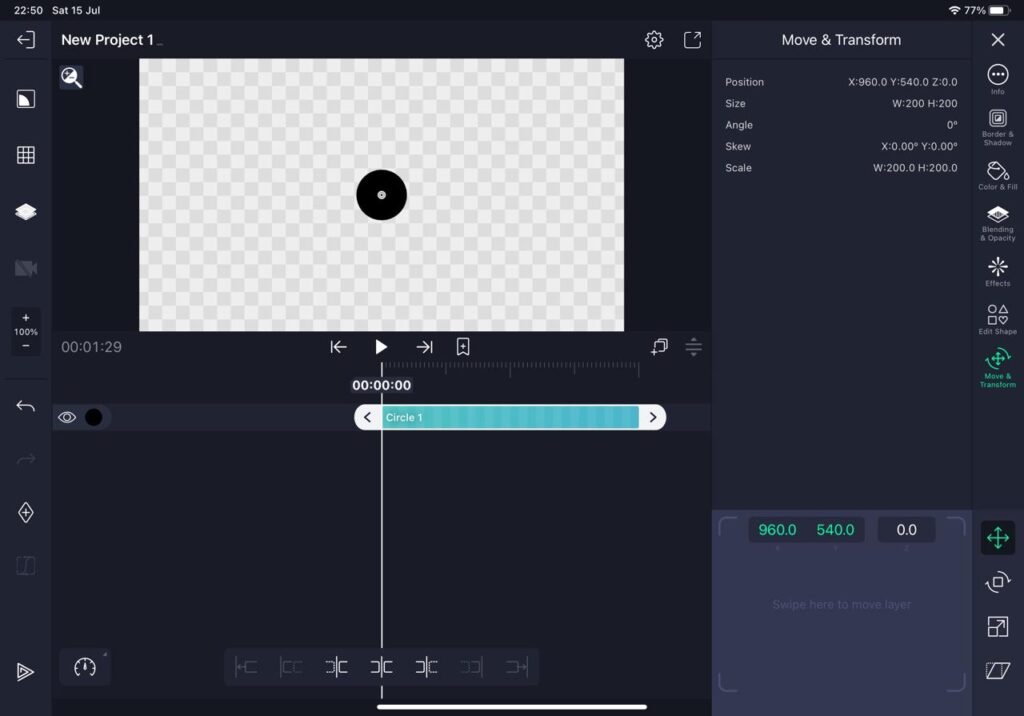
How to Work with Keyframes In Animation? Keyframes in Animation:
Keyframes are crucial in animation as they define the starting and ending points of an object’s motion. In between these keyframes, the animation software interpolates the intermediate frames, creating a fluid movement. This technique, known as interpolation, allows for precise control over an object’s behavior throughout the animation.
How to Work with Keyframes In Animation?
Alight Motion is a powerful mobile application for creating professional animations and motion graphics. It provides intuitive tools for working with keyframes, giving you full control over your animations.
To add keyframes in Alight Motion, follow these steps:
- Open Alight Motion and import your desired project or create a new one.
- Select the element or object you want to animate.
- Locate the timeline and navigate to the desired frame.
- Tap on the keyframe icon to add a keyframe to the current frame.
- Move the timeline cursor to another frame and make the necessary changes to the element.
- Alight Motion will automatically create the necessary frames between the keyframes, resulting in a smooth animation.
You can adjust various properties of the keyframes, such as position, scale, rotation, opacity, and more, to achieve the desired effect. Experiment with different keyframe placements and properties to create engaging and dynamic animations.
How to Work with Keyframes In Animation? Using Keyframes on iOS:
To use keyframes on iOS, consider the following steps:
- Identify the element or object you want to animate within your iOS app.
- Utilize Core Animation’s keyframe animation capabilities to define the animation sequence.
- Set the desired properties for each keyframe, such as position, scale, opacity, and rotation.
- Specify the timing and duration for each keyframe to control the animation’s speed and easing.
- Implement the keyframe animation code within your iOS app to activate the animation.
FAQs:
Are keyframes free?
Yes, keyframes are free in Alight Motion. You can use them to create animations by adding and adjusting the properties of objects over time.
Can I edit keyframes after I’ve created them?
Most animation softwares including Alight Motion lets you edit keyframes after the creation.
Conclusion:
Keyframes are fundamental to the world of animation. Whether you are working with Alight Motion or iOS animation, understanding how to utilize keyframes effectively is essential. By strategically placing keyframes and adjusting their properties, you can bring life to your animations and captivate your audience.